

FontBook New version:
Elevating Creative Horizons with Innovative Features
In the fast-paced world of design and creativity, staying ahead often means embracing innovation and adopting cutting-edge tools. The latest version of FontBook, offering an array of features designed to enhance your creative endeavors.
Enhanced Creativity:
More Free Copies
FontBook App invites you to dive deeper into your creative journey by providing 50 free copies. This enhancement allows users to experiment freely with fonts, colors, and effects without any constraints, fostering a more open and explorative design process.
Quick Copy to Social Media
In an era where social media is an integral part of content sharing, FontBook App new version simplifies the process. With just one click, you can now redirect your designs directly to social media platforms, facilitating seamless sharing and showcasing your creativity to a wider audience.
Consistent UI
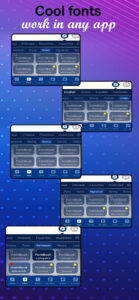
A harmonized design is at the core of FontBook 2.0, ensuring a unified visual experience across effects, colors, fonts, and shadows. This consistent user interface not only enhances the aesthetics but also contributes to a smoother and more intuitive design process.
Improved Keyboard Top Bar
Accessing key options is now more convenient with FontBook 2.0’s redesigned top bar. This improvement streamlines the user experience, allowing for quicker and more efficient navigation while working on your designs.
Expanded Font UI
Font exploration is taken to the next level with the PullUp feature, displaying nine fonts at a time. This expanded Font UI provides a more comprehensive view, making it easier for users to find the perfect font for their creative projects.
Auto-Scroll for Colors
Effortlessly explore a spectrum of colors with FontBook 2.0’s automatic scrolling feature. This addition simplifies the color selection process, enabling users to find the perfect hue with ease.
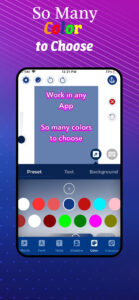
Color Picker Enhancement
Discover an enhanced color palette with new colors added to the beginning of the list. This enhancement not only provides a broader range of options but also ensures that the latest and trendiest colors are readily available for your designs.
Export Quality Option
FontBook 2.0 empowers users with the ability to customize export quality options. Tailor your designs to meet specific requirements and ensure the highest quality when sharing or printing your creative works.
Animated Text Effects
Bring your text to life with FontBook 2.0’s animated text effects. Now, you can export your animated text creations as GIFs, adding an extra layer of dynamism to your designs.
Text Art Integration
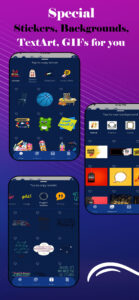
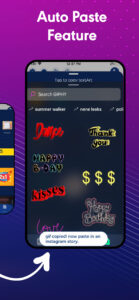
Text Art joins the ranks of Stickers, Backgrounds, and Giphy, expanding your toolkit for creative expression. With Text Art integration, FontBook new version offers a diverse range of elements to elevate your designs.
Favorites for Effects
Accessing your go-to effects is now a breeze with the Favorites feature. Easily mark and retrieve your favorite effects for a more efficient and personalized design experience.
My Effects Customization
Take customization to the next level by saving and storing your personalized effects in “My Effects.” FontBook new update ensures that your creative toolkit is tailored to your unique style and preferences.
Reset Button
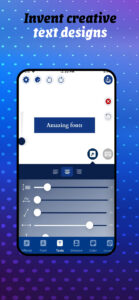
FontBook new update introduces a reset button, allowing users to reset all properties with a single click. This feature provides a quick and convenient way to start afresh or undo unintended changes during the design process.
Undo/Redo Feature
Navigate freely through your design journey with FontBook new update, Undo/Redo feature. Experiment with confidence, knowing that you can easily backtrack or move forward in your creative process.
History Feature
FontBook new version automatically saves and manages your design history. This feature offers a comprehensive overview of your creative evolution, allowing you to revisit and learn from your design iterations.
Auto Paste from Clipboard
Seamlessly integrate your clipboard content into your designs with the Auto Paste feature. FontBook new version ensures a fluid and uninterrupted creative experience by enabling automatic pasting.